

As all of you may imagine, it is not only about installing new software but also about keeping the new software up to date… And that is why this is entry is published! I want to detail what I did to update my laptop’s libreboot installation.
Pre-requisites
- A laptop that is already running libreboot
Prepare the laptop
I cloned the official libreboot git repository.
git clone https://codeberg.org/libreboot/lbmkI installed dependencies for debian.
cd lbmk
git checkout 25.06
./mk dependencies debian
I built flashprog firmware.
./mk -b flashprogOnce the build was completed, some binary files were generated at ./elf/flashprog/flashprog
Build the the BIOS firmware
As I did when building libreboot for the first time, I built the BIOS firmware using below parameters
./mk -b coreboot t480s_vfsp_16mbBackup laptop’s BIOS
To verify the dump was correct, I created three dumps from the same BIOS.
Dump 1
jeronimodiaz@thinkpad:~/git/lbmk$ sudo ./elf/flashprog/flashprog -p internal:laptop=force_I_want_a_brick,boardmismatch=force -r dump.bin
[sudo] password for jeronimodiaz:
flashprog p1.4-2-g564c93d on Linux 6.1.0-40-amd64 (x86_64)
flashprog is free software, get the source code at https://flashprog.org

Using clock_gettime for delay loops (clk_id: 1, resolution: 1ns).
coreboot table found at 0x7aa33000.
Found chipset "Intel Kaby Lake U w/ iHDCP2.2 Prem.".
Enabling flash write... Warning: Setting BIOS Control at 0xdc from 0x8b to 0x89 failed.
New value is 0x8b.
SPI Configuration is locked down.
OK.
Found Programmer flash chip "Opaque flash chip" (16384 kB, Programmer-specific) on internal.
Reading flash... done.
Dump 2
jeronimodiaz@thinkpad:~/git/lbmk$ sudo ./elf/flashprog/flashprog -p internal:laptop=force_I_want_a_brick,boardmismatch=force -r dump1.bin
flashprog p1.4-2-g564c93d on Linux 6.1.0-40-amd64 (x86_64)
flashprog is free software, get the source code at https://flashprog.org

Using clock_gettime for delay loops (clk_id: 1, resolution: 1ns).
coreboot table found at 0x7aa33000.
Found chipset "Intel Kaby Lake U w/ iHDCP2.2 Prem.".
Enabling flash write... Warning: Setting BIOS Control at 0xdc from 0x8b to 0x89 failed.
New value is 0x8b.
SPI Configuration is locked down.
OK.
Found Programmer flash chip "Opaque flash chip" (16384 kB, Programmer-specific) on internal.
Reading flash... done.
Dump 3
jeronimodiaz@thinkpad:~/git/lbmk$ sudo ./elf/flashprog/flashprog -p internal:laptop=force_I_want_a_brick,boardmismatch=force -r dump2.bin
flashprog p1.4-2-g564c93d on Linux 6.1.0-40-amd64 (x86_64)
flashprog is free software, get the source code at https://flashprog.org

Using clock_gettime for delay loops (clk_id: 1, resolution: 1ns).
coreboot table found at 0x7aa33000.
Found chipset "Intel Kaby Lake U w/ iHDCP2.2 Prem.".
Enabling flash write... Warning: Setting BIOS Control at 0xdc from 0x8b to 0x89 failed.
New value is 0x8b.
SPI Configuration is locked down.
OK.
Found Programmer flash chip "Opaque flash chip" (16384 kB, Programmer-specific) on internal.
Reading flash... done.
Once the backups are completed, I compared them to verify they are correct.
jeronimodiaz@thinkpad:~/git/lbmk$ sha1sum dump.bin
118e6381b370a3cabbcdf481ef64d3bdc8b2cec6  dump.bin
jeronimodiaz@thinkpad:~/git/lbmk$ sha1sum dump1.bin
118e6381b370a3cabbcdf481ef64d3bdc8b2cec6  dump1.bin
jeronimodiaz@thinkpad:~/git/lbmk$ sha1sum dump2.bin
118e6381b370a3cabbcdf481ef64d3bdc8b2cec6  dump2.bin
Flash BIOS firmware
As my laptop was already running libreboot, I didn’t need to use any external flashing and I was able to update the BIOS firmware using the flashprog tool directly in the laptop.
jeronimodiaz@thinkpad:~/git/lbmk$ sudo ./elf/flashprog/flashprog -p internal:laptop=force_I_want_a_brick,boardmismatch=force -w bin/t480s_vfsp_16mb/seabios_t480s_vfsp_16mb_libgfxinit_corebootfb.rom
flashprog p1.4-2-g564c93d on Linux 6.1.0-40-amd64 (x86_64)
flashprog is free software, get the source code at https://flashprog.org

Using clock_gettime for delay loops (clk_id: 1, resolution: 1ns).
coreboot table found at 0x7aa33000.
Found chipset "Intel Kaby Lake U w/ iHDCP2.2 Prem.".
Enabling flash write... Warning: Setting BIOS Control at 0xdc from 0x8b to 0x89 failed.
New value is 0x8b.
SPI Configuration is locked down.
OK.
Found Programmer flash chip "Opaque flash chip" (16384 kB, Programmer-specific) on internal.
Reading old flash chip contents... done.
Erasing and writing flash chip... Erase/write done.
Verifying flash... VERIFIED.
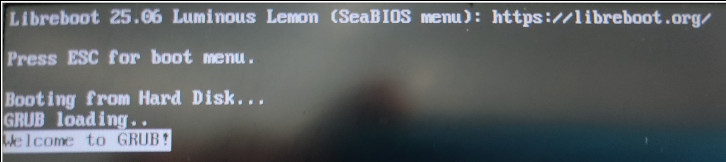
At this point, the laptop’s BIOS is updated and running version 25.06.
I hope you found useful this post. If you have any question, do not hesitate to share it in comments. I will be happy to help you.
See you in the next post!
